Three Big Shifts Graphic

I know I posted about this concept earlier, but I really like this graphic that simply shows what the three shifts are.

This idea is from Scott McCleod. I attended his full day workshop in Mumbai. If we look at our teaching and think, how can we move our lessons toward the desired end of this, then we will be making progress in transforming education.
Developing a PLN

One of the first things we were tasked with in this series of courses for Future Ready Teachers was to develop our PLN or Personal Learning Network. I had tried Twitter before when taking my USD courses, but it didn’t really stick. Now I think I might just keep tweeting. I have even got things set up with the class Twitter account so that tomorrow my kids will be sending out tweets. If you have a fifth grade class and a class Twitter account, then you might want to follow us and we might want to follow you. You can find us at @TeacherMoulton #TASTigers5

Here is a site that talks about developing your PLN.

Three Big Shifts or Shift Happens

I had to laugh when I got to Scott McCleod’s Dangerously Irrelevant blog site and saw his “Shift Happens” page. I recently got to spend the day with Scott at a pre-conference at ASB’s Unplugged Technology Conference in Mumbai, India. He was a dynamic presenter and had us moving and talking during the full day session.

I have tried to implement SAMR and T-PAC before with some success but his Trudacot tool (name not withstanding) really works to transform lessons. His three big shifts are moving from teacher-directed to student-directed; analog to digital; and low-level thinking to high-level thinking.  Here is the link to one of his twitcasts.  You might also want to follow his blog.

Student Agency

A few years ago I read a slim book called Choice Words by Peter Johnston and it changed how I spoke to my students. I liked it because it helped me foster student agency/efficacy.

In this second course as we discuss PBL, student agency is a key component because students are given opportunities to develop passions, investigate their own interests, and work independently.  Here is a great article from Unboxed by Eduardo Briceño that connects student agency to mindsets.

Excited About Using Edmodo With PBL

Since I am the only teacher left at TAS using Edmodo, I was particularly excited to see this webinar on how I might utilize it to help me with my PBL in science and/or the PBL I’m contemplating doing with my Student Council kids.

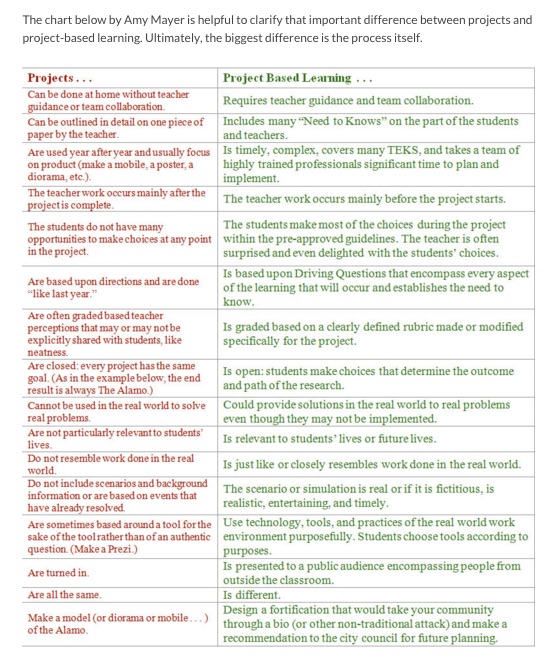
This also talks about the difference between projects and PBL–product vs process.

This addresses eight essential elements of PBL. Want to learn more about it? Go for it.

Here is the link to the webinar. (It is about 48 minutes long.)

Projects vs Project-Based Learning

This difference reminds me of when cooperative learning was big and teachers would say, “My kids work in groups all of the time.” Cooperative learning was so much more than working in groups. This seems like a similar comparison.
Here is a link that compares the traditional project assignment vs the process of PBL.

Projects vs Project-Based Learning Chart.jpg

From:
What’s the Difference Between “Doing Projects” and Project Based Learning ?Image attribution flickr user josekevo; The Difference Between Projects And Project-Based Learning; © Amy Mayer, @friEdTechnology, The Original WOW! Academy, http://www.friEdTechnology.com Please copy and use freely!

Project/Problem Based Learning

The second course is all about PBL which isn’t new at all. Since I’ve been around quite awhile, I can attest to the fact that it has cycled through at least twice. It is usually attached to inquiry. I have watched a bunch of videos and read a lot of articles to create a lesson for my students  (not done yet), but I find this video from Edutopia to be one of the best. The explanation of why PBL didn’t “stick” before is right on.


Curation Tool: Pocket

As I am now following many groups and people on Twitter and Google+, there are a lot of articles and sites that I want to hang onto. I have used Pinterest, Scoop It, Symbaloo, and many other tools like Readers, but folks in this cohort suggested Pocket. I installed the little pocket on my browser  Pocket icon.jpg so that when I find a site I like, I click the pocket and it saves it. Now when I go the Pocket site, there is a display with images that show what I’ve saved.
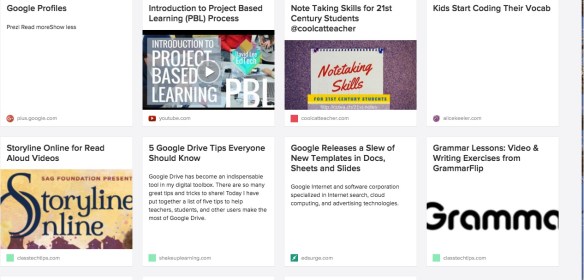
If you want to try it, here’s the linkwhat pocket looks like.

Collaborate With The World Lesson

For this two week course, we needed to connect with some of the teachers in this cohort to create and deliver a lesson. The teachers I worked with and I created a Google Form to survey students in our respective classrooms about their music preferences. Some students created graphs using the data in the spreadsheet of responses. Each class located the other classes who participated in the survey on a Google Map. Some classes visited the other classes’ websites. My class will post results on their blogs and we will further investigate why a certain part of the world might prefer the music they do.

Here is the link to the lesson.